
Client admins can import knowledge sources for an AI agent by selecting the desired AI agent from the drop-down menu in the top-right corner. Depending on whether the agent is zero-training or agentic, navigate to either "Settings Generative replies Knowledge sources" or "Content Knowledge Knowledge sources" in the sidebar. Click "Add source" and choose from options like Zendesk, Salesforce, Freshdesk, CSV file, or web crawler. Follow specific instructions for the chosen source type to complete the import process.
Importing a knowledge source
Client admins can import knowledge sources for an AI agent.
To import a knowledge source
- In the top-right corner, use the AI agent drop-down field to select the AI agent you want to import a knowledge source for.
- In the left sidebar, click either of the following:
- Settings > Generative replies > Knowledge sources for a zero-training AI agent.
-
Content > Knowledge > Knowledge sources for an agentic AI agent.
The Knowledge sources page opens.
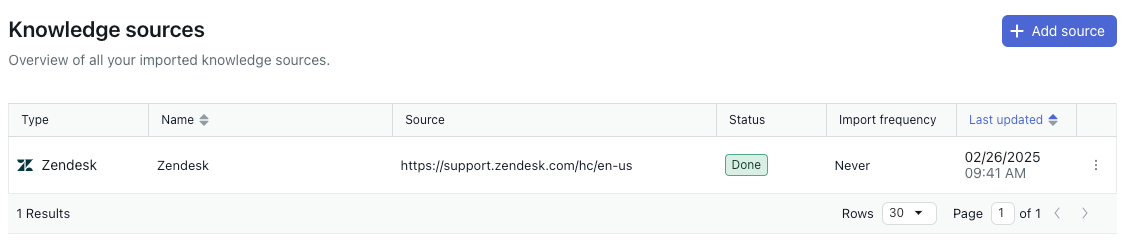
- Click Add source.The Add source pane opens.
- In the Type dropdown, select one of the following options:
- Zendesk: Imports a Zendesk help center.
- Salesforce: Imports a Salesforce help center.
- Freshdesk: Imports a Freshdesk help center.
- File (CSV): Imports a file in the .csv format.
- Web crawler: Imports content from a specified website.
- Follow the instructions below for the source you chose:
Comments
0 comments
Please sign in to leave a comment.